
Reducing landlord's burden of handling properties using property management web app
About the product
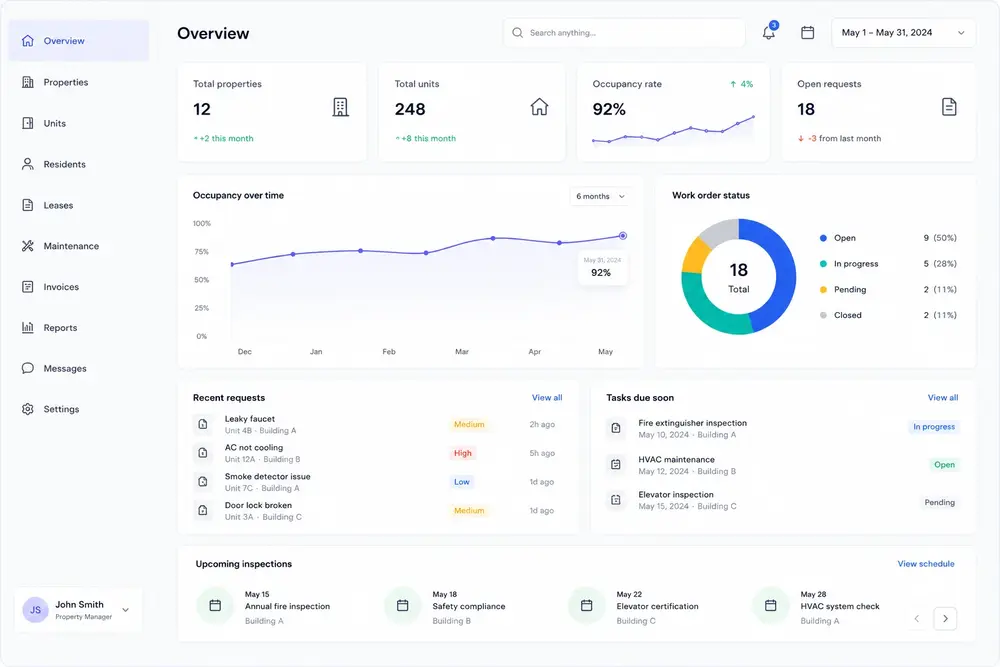
Condexo Property Management brought day-to-day rental management into one place for landlords, tenants, and contractors. Payments, communication, maintenance, documents, and scheduling were meant to live in a single application instead of a pile of separate tools.
This was my second project with Condexo, after shipping the MVP for Condexo Pay. I joined as a frontend developer to help build the property-management MVP. That meant turning the client's designs into React, building the product workflows, integrating APIs and payments, and helping decide how the frontend should be put together.
What we were building
The product had to work for three kinds of users on one platform. Landlords needed to manage portfolios, tenants needed to pay rent and raise requests, and contractors needed to coordinate jobs. Each group needed different things, but it still had to feel like one property management system.
The frontend team was a couple of React developers, including me, working with backend developers and a project manager. The client's in-house designer provided the screens. Their development team reviewed the work before it went to production.
The MVP had to cover a lot, including properties and tenancies, payments, calendar, chat, documents, and notifications. A small frontend team also needed to keep adding to it without stepping on each other. So we had to decide where to add structure, what to take off the shelf, and where custom work was actually worth it.
Engineering Decisions
For each of these, we started from a real product problem, looked at the options, and picked what fit the MVP best. If something was already a solved problem, we used an existing solution. Custom work went into the Condexo-specific workflows.
1. Structure: feature / container folders
The app was going to grow across properties, tenancies, payments, calendar, and communication. More than one frontend developer would be working at once. If everything lived in generic shared folders, related code would scatter and people would keep bumping into the same files.
How should we organise the codebase so features stay separate and developers can work in parallel without getting in each other's way?
File-type / layer folders
- Easy to set up at the start
- Familiar components, reducers, and sagas layout
- Code for one feature ends up spread around
- Shared folders become places people collide
Feature / container folders
- Clearer feature boundaries
- Related UI and behaviour stay together
- Easier to own work between developers
- Holds up better as more features land
Hybrid shared core + features
- Shared pieces live in a common layer
- Features still own most product behaviour
- Needs clearer rules for what is shared
- More to agree on before the MVP ships
We went with feature and container folders. It kept ownership clear as the product grew, which mattered more than starting with a simpler file-type layout.
2. Forms: React Forms + Yup
Landlords, tenants, and contractors all had forms. They were creating properties and tenancies, collecting details, validating them, and sending them off. If we built field state, validation, errors, and submit behaviour ourselves for every form, we would spend the MVP on plumbing instead of the product.
With so many forms and a tight MVP, how should we handle form state and validation?
Build in-house
- Full control over how forms work
- More work before anything ships
- We own validation and how forms run
- More code to keep consistent
Formik
- Popular way to manage form state in React
- Works well with schema validation libraries
- Still need to choose and wire up validation
- More to learn than we needed for MVP forms
React Final Form
- Updates form state through subscriptions
- Good performance story for large forms
- Harder for the team to pick up
- More than we needed for the MVP forms
React Forms + Yup
- Handles form state without us building it
- Yup schemas keep validation explicit and consistent
- Less repeated work across many forms
- Faster to ship with the MVP
We chose React Forms with Yup. It gave us consistent validation and less repeated form code, without us owning a form library of our own. We gave up some control. That was fine for the MVP.
3. UI: React Bootstrap + custom where needed
The UI was a mix. Tables, modals, and form layouts were ordinary. Calendar, chat, notifications, and rent payments were not. Building every component ourselves would have taken too long. Pushing the product-specific bits into a generic component kit would have made those flows worse.
How do we ship ordinary UI quickly and still build the property-specific parts properly?
Build all UI custom
- Full control over every interaction
- Most work before screens ship
- We own more design and accessibility ourselves
- Slow on ordinary screens
Material UI (full kit)
- Large set of ready-made components
- Good defaults for ordinary UI
- Heavier look to adopt and override
- Harder when a workflow needs custom behaviour
React Bootstrap + custom
- Solid building blocks for ordinary UI
- Lighter to take on in an MVP React app
- Room to build calendar, chat, and similar flows
- Clear split between reuse and custom work
We used React Bootstrap for the ordinary screens and built calendar and chat ourselves. Notifications and rent payments were treated as product features, not just styled components. We did not get a complete design system the way a full kit like Material UI would have given us. We did get faster standard screens and room to build the unusual ones.
4. Payments: Stripe
Rent and other payments sat at the centre of the product. We needed something reliable that worked in a React web app, did not put card data in our own systems, and could ship with the MVP.
How should the product take payments without us building a payments stack?
Build on bank / processor APIs
- Full control over the payment path
- We own more of the security and ops work
- Longer to integrate and certify
- Too slow for the MVP
Alternative payment provider
- Could cover basic card payments
- React or web SDK quality varies by provider
- Docs and ops tools are often thinner
- Less predictable for MVP payment flows
Stripe
- Mature payments setup and web SDK
- Straightforward to use from a React frontend
- Card data stays with Stripe, not in our app
- Quickest reliable way to take payments in the MVP
We chose Stripe. It was the strongest option for reliability, React integration, keeping card data out of our app, and shipping on time. The frontend wired payments into the rest of the product. Stripe ran the payment service.
Frontend foundation
These choices gave us a frontend with clear feature ownership, off-the-shelf pieces where they fit, and custom work where the product needed it.
That was enough to grow properties, tenancies, payments, calendar, chat, and notifications without rebuilding the stack each time.
Outcome
The MVP went live in May 2020. It got the property-management product into production and helped bring more investors onto the project.
Work continued after that. Version 2.0 shipped in February 2021 with new features and a better experience as the product grew.
Testimonials


It was a pleasure to work with Parmeet, an honest and reliable Dev!

I really enjoyed working with Parmeet. Highly recommended for React-based web development projects with the rich user interfaces. He is eager to learn and improve in all areas. He has excellent communication and technical skills. He is hard-working, ensures deadlines are duly met, and never compromises with product quality.

Parmeet is an excellent developer and a great friend, he is really good in React and has been a real gem to our last company. His technical skills are impressive as per his experience. He always makes sure to meet all the deadlines within a given time frame & with the top standards. He is hardworking & dedicated in his work. It is a pleasure and honor to recommend Parmeet to anyone who wants to hire him.

Parmeet is a good and technical sound is his work. I worked with him on 2 projects and he developed the project proficiently on frontend and backend. I hope to get work opportunities with him in future so we can connect the world together for the betterment.
Let's bring your nextbig idea to life

Whether you're brainstorming ideas, looking to bolster capabilities, rapidly expanding your team, or delegating projects, count on us to meet your needs effectively any or every step of the way
Available for new engagements